返回列表 发布新帖
楼主: zelefans

[10.5]VR视频工具箱CUDA专版2.0.3版,逐句情感语音克隆补丁3

 火..

325

金钱

76

回帖

90

积分

Lv4 初窥堂奥

积分
90
发表于 2026-6-23 13:39:32 | 显示全部楼层
我在夸克下载的文件 有一个VRVTNE差量更新__1.0_to_1.1,这个文件,是解压后 直接拷贝到{VR_Video_Toolbox_CE}文件夹里面,然后覆盖原有文件的吗?
装过1.0版本,直接覆盖之前目录就好 
发表于 2026-6-23 14:00

672

金钱

800

回帖

415

积分

Lv6 渐入佳境

积分
415
 楼主| 发表于 2026-6-23 13:48:03 | 显示全部楼层
haoren918 发表于 2026-6-23 13:35
一直在等更新,那个字幕翻译的确有问题,有些短语无法翻译。还有就是能否本地翻译功能啊,ds固然好,还是得 ...

字幕不是翻译问题,是语音转录文字的问题,之前测试的视频太少没感觉到,当时都做有大段对话的不明显。这次做语音克隆就发现几个新的视频漏了蛮多句子,查了之后才发现是一直以来的BUG。没人具体反馈啊,给个视频就能早点发现的。。。。

325

金钱

76

回帖

90

积分

Lv4 初窥堂奥

积分
90
发表于 2026-6-23 17:47:35 | 显示全部楼层
下午试了透视服务器,我设定的目录内,有很多个视频文件,比如20-30个文件,这个时候,就不知道哪个视频才是我要看的。另外貌似没有2D转3D的选项,也没有透视,实时的只能同声转译。直白一点说就是没有以前的设置选项了,我是把最新的差量更新里的文件,覆盖了下载解压的最新的{VR_Video_Toolbox_CE】文件夹。ps:我用的播放器是4xvr
VR视频透视服务器是独立的的程序,VR视频工具箱(CUDA版),这是两套程序。 VR视频工具箱的 DLNA功能只有文件名自适应和新的同声传译直播流功能 
发表于 2026-6-23 19:11

11

金钱

99

回帖

102

积分

VR会员

积分
102
发表于 2026-6-23 23:03:12 | 显示全部楼层
致敬大佬!

47

金钱

44

回帖

45

积分

Lv3 圆转纯熟

积分
45
发表于 2026-6-24 17:11:00 | 显示全部楼层
那个models完整离线包要下载吗,有什么用?直接解压到根目录就行了?
在models目录里,都是上GB的模型,未必会用到,必须字幕听写模型就有3个,但如果要用的话就必须自己另外下载了 
发表于 2026-6-24 17:47

47

金钱

44

回帖

45

积分

Lv3 圆转纯熟

积分
45
发表于 2026-6-24 21:36:45 | 显示全部楼层
[2026-06-24 20:33:22] === Process log started 2026-06-24 20:33:22 ===
[2026-06-24 20:33:22] [log] file: E:\PLYY\[email protected]_process.log
[2026-06-24 20:33:22] [log] input: E:\PLYY\[email protected]
[2026-06-24 20:33:22] [log] cwd: E:\VR_Video_Toolbox_CE
[2026-06-24 20:33:22] [Diagnostics] Running: ffprobe -v error -print_format json -show_format -show_streams E:/PLYY/[email protected]
[2026-06-24 20:33:22] [Diagnostics] Bitrate detected: 17834596 bps (decoded via utf-8)
[2026-06-24 20:33:22] [bitrate] stage=intermediate source=8917kbps keep_original=True multiplier=2.00 -> target=17834kbps
[2026-06-24 20:33:22] [source-scan] Stage 1 scanning source: E:\PLYY\[email protected]
[2026-06-24 20:33:22] [source-scan] mode=sbs, use_fisheye=True, pre_extract_inner=True, keep_intermediate=False
[2026-06-24 20:33:22] [source-scan] temp dir: E:\PLYY\[email protected]_SSTART_EEND_sbs.restored_scan_tmp
[2026-06-24 20:33:22] [source-scan] final output: E:\PLYY\[email protected]_SSTART_EEND_sbs.restored.mp4
[2026-06-24 20:33:22] [source-scan] scan strategy: keyframes
[2026-06-24 20:33:34] [source-scan] GPU keyframe scan: 381 keyframes, left-eye original-size crop 4096x2048 -> 2048x2048, route=gpu_nv12
[2026-06-24 20:33:36] [pre-extract] loading detector lada_vr_mosaic_detection_model_v2_accurate.pt on cuda, imgsz=2048, conf=0.20
[2026-06-24 20:33:38] [source-scan] scanned 1 GPU keyframes (0.3%) at 34.5 samples/s
[2026-06-24 20:33:43] [source-scan] scanned 14 GPU keyframes (3.7%) at 2.8 samples/s
[2026-06-24 20:33:48] [source-scan] scanned 30 GPU keyframes (7.9%) at 3.0 samples/s
[2026-06-24 20:33:53] [source-scan] scanned 46 GPU keyframes (12.1%) at 3.0 samples/s
[2026-06-24 20:34:14] [source-scan] scanned 60 GPU keyframes (15.7%) at 1.7 samples/s
[2026-06-24 20:34:19] [source-scan] scanned 77 GPU keyframes (20.2%) at 1.9 samples/s
[2026-06-24 20:34:24] [source-scan] scanned 94 GPU keyframes (24.7%) at 2.0 samples/s
[2026-06-24 20:34:29] [source-scan] scanned 111 GPU keyframes (29.1%) at 2.2 samples/s
[2026-06-24 20:35:04] [source-scan] scanned 119 GPU keyframes (31.2%) at 1.4 samples/s
[2026-06-24 20:35:38] [source-scan] scanned 120 GPU keyframes (31.5%) at 1.0 samples/s
[2026-06-24 20:36:11] [source-scan] scanned 122 GPU keyframes (32.0%) at 0.8 samples/s
[2026-06-24 20:36:44] [source-scan] scanned 123 GPU keyframes (32.3%) at 0.7 samples/s
[2026-06-24 20:37:18] [source-scan] scanned 124 GPU keyframes (32.5%) at 0.6 samples/s
[2026-06-24 20:37:51] [source-scan] scanned 125 GPU keyframes (32.8%) at 0.5 samples/s
[2026-06-24 20:38:25] [source-scan] scanned 126 GPU keyframes (33.1%) at 0.4 samples/s
[2026-06-24 20:38:58] [source-scan] scanned 127 GPU keyframes (33.3%) at 0.4 samples/s
[2026-06-24 20:39:31] [source-scan] scanned 128 GPU keyframes (33.6%) at 0.4 samples/s
[2026-06-24 20:40:05] [source-scan] scanned 130 GPU keyframes (34.1%) at 0.3 samples/s
[2026-06-24 20:40:38] [source-scan] scanned 131 GPU keyframes (34.4%) at 0.3 samples/s
[2026-06-24 20:41:12] [source-scan] scanned 132 GPU keyframes (34.6%) at 0.3 samples/s
[2026-06-24 20:41:45] [source-scan] scanned 133 GPU keyframes (34.9%) at 0.3 samples/s
[2026-06-24 20:42:18] [source-scan] scanned 134 GPU keyframes (35.2%) at 0.3 samples/s
[2026-06-24 20:42:51] [source-scan] scanned 135 GPU keyframes (35.4%) at 0.2 samples/s
[2026-06-24 20:43:25] [source-scan] scanned 136 GPU keyframes (35.7%) at 0.2 samples/s
[2026-06-24 20:43:59] [source-scan] scanned 138 GPU keyframes (36.2%) at 0.2 samples/s
[2026-06-24 20:44:32] [source-scan] scanned 139 GPU keyframes (36.5%) at 0.2 samples/s
[2026-06-24 20:45:05] [source-scan] scanned 140 GPU keyframes (36.7%) at 0.2 samples/s
[2026-06-24 20:45:39] [source-scan] scanned 141 GPU keyframes (37.0%) at 0.2 samples/s
[2026-06-24 20:46:12] [source-scan] scanned 142 GPU keyframes (37.3%) at 0.2 samples/s
[2026-06-24 20:46:46] [source-scan] scanned 143 GPU keyframes (37.5%) at 0.2 samples/s
[2026-06-24 20:47:19] [source-scan] scanned 144 GPU keyframes (37.8%) at 0.2 samples/s
[2026-06-24 20:47:53] [source-scan] scanned 146 GPU keyframes (38.3%) at 0.2 samples/s
[2026-06-24 20:48:26] [source-scan] scanned 147 GPU keyframes (38.6%) at 0.2 samples/s
[2026-06-24 20:48:59] [source-scan] scanned 148 GPU keyframes (38.8%) at 0.2 samples/s
[2026-06-24 20:49:33] [source-scan] scanned 149 GPU keyframes (39.1%) at 0.2 samples/s
[2026-06-24 20:50:06] [source-scan] scanned 150 GPU keyframes (39.4%) at 0.2 samples/s
[2026-06-24 20:50:40] [source-scan] scanned 151 GPU keyframes (39.6%) at 0.1 samples/s
[2026-06-24 20:51:13] [source-scan] scanned 152 GPU keyframes (39.9%) at 0.1 samples/s
[2026-06-24 20:51:47] [source-scan] scanned 154 GPU keyframes (40.4%) at 0.1 samples/s
[2026-06-24 20:52:20] [source-scan] scanned 155 GPU keyframes (40.7%) at 0.1 samples/s
[2026-06-24 20:52:53] [source-scan] scanned 156 GPU keyframes (40.9%) at 0.1 samples/s
[2026-06-24 20:53:27] [source-scan] scanned 157 GPU keyframes (41.2%) at 0.1 samples/s
[2026-06-24 20:54:00] [source-scan] scanned 158 GPU keyframes (41.5%) at 0.1 samples/s
[2026-06-24 20:54:33] [source-scan] scanned 159 GPU keyframes (41.7%) at 0.1 samples/s
[2026-06-24 20:55:07] [source-scan] scanned 160 GPU keyframes (42.0%) at 0.1 samples/s
[2026-06-24 20:55:40] [source-scan] scanned 162 GPU keyframes (42.5%) at 0.1 samples/s
[2026-06-24 20:56:14] [source-scan] scanned 163 GPU keyframes (42.8%) at 0.1 samples/s
[2026-06-24 20:56:47] [source-scan] scanned 164 GPU keyframes (43.0%) at 0.1 samples/s
[2026-06-24 20:57:20] [source-scan] scanned 165 GPU keyframes (43.3%) at 0.1 samples/s
[2026-06-24 20:57:54] [source-scan] scanned 166 GPU keyframes (43.6%) at 0.1 samples/s
[2026-06-24 20:58:27] [source-scan] scanned 167 GPU keyframes (43.8%) at 0.1 samples/s
[2026-06-24 20:59:01] [source-scan] scanned 168 GPU keyframes (44.1%) at 0.1 samples/s
[2026-06-24 20:59:34] [source-scan] scanned 170 GPU keyframes (44.6%) at 0.1 samples/s
[2026-06-24 21:00:07] [source-scan] scanned 171 GPU keyframes (44.9%) at 0.1 samples/s
[2026-06-24 21:00:41] [source-scan] scanned 172 GPU keyframes (45.1%) at 0.1 samples/s
[2026-06-24 21:01:14] [source-scan] scanned 173 GPU keyframes (45.4%) at 0.1 samples/s
[2026-06-24 21:01:48] [source-scan] scanned 174 GPU keyframes (45.7%) at 0.1 samples/s
[2026-06-24 21:02:21] [source-scan] scanned 175 GPU keyframes (45.9%) at 0.1 samples/s
[2026-06-24 21:02:54] [source-scan] scanned 176 GPU keyframes (46.2%) at 0.1 samples/s
[2026-06-24 21:03:28] [source-scan] scanned 178 GPU keyframes (46.7%) at 0.1 samples/s
[2026-06-24 21:04:18] [source-scan] scanned 179 GPU keyframes (47.0%) at 0.1 samples/s
[2026-06-24 21:04:23] [source-scan] scanned 196 GPU keyframes (51.4%) at 0.1 samples/s
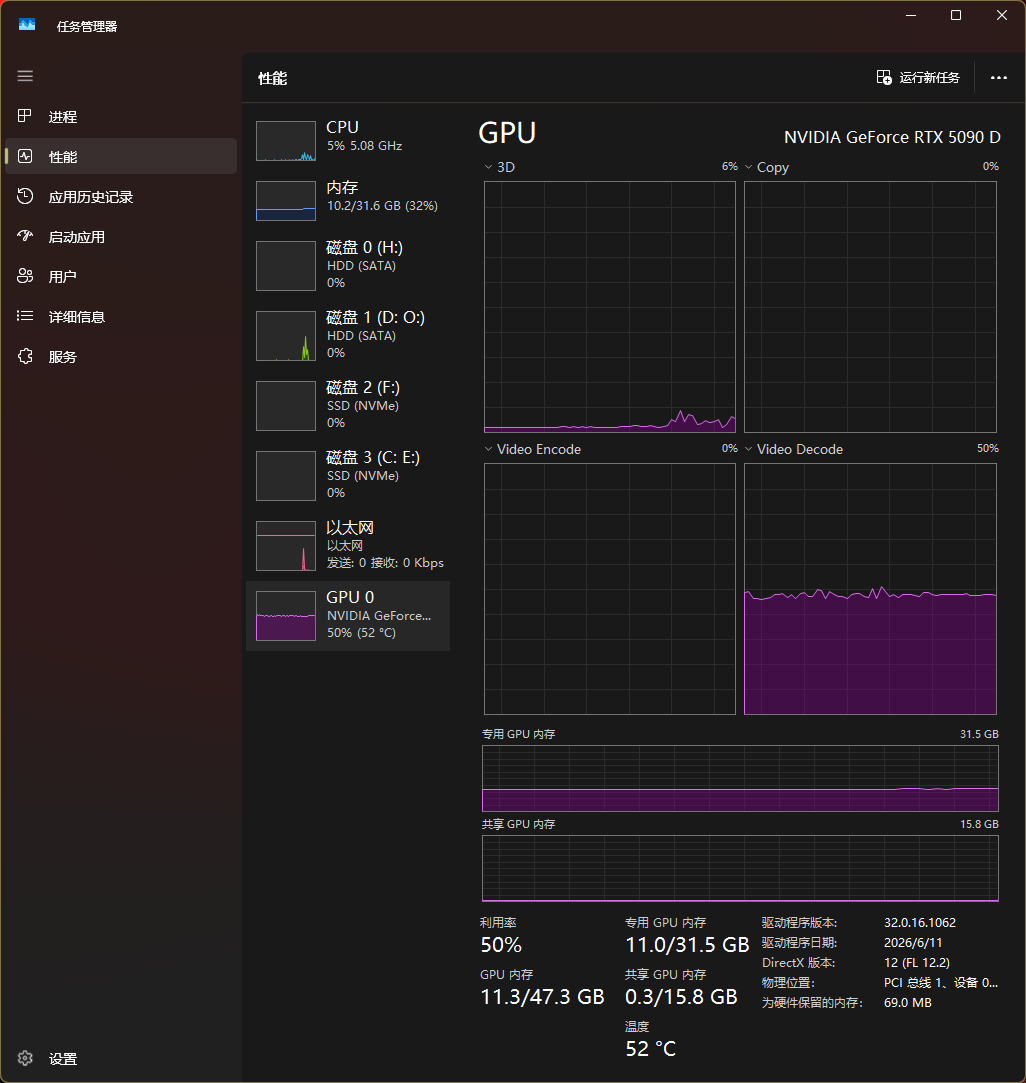
为什么特别慢,到这还闪退了。。。
看起来显存满,所以崩了,什么显卡,多大的显存 
发表于 2026-6-24 22:51

47

金钱

44

回帖

45

积分

Lv3 圆转纯熟

积分
45
发表于 2026-6-24 23:03:25 | 显示全部楼层
5090D,32G显存,显存占用一直11G左右,另外视频解码那里占用一直只有一半是正常的吗?
QQ20260624-230216.png

1317

金钱

3095

回帖

1304

积分

VR会员

宗门老怪

积分
1304
发表于 2026-6-25 00:10:24 | 显示全部楼层
kf018@10050 发表于 2026-6-24 23:03
5090D,32G显存,显存占用一直11G左右,另外视频解码那里占用一直只有一半是正常的吗? ...

你用lada破解?jasna破解?5090,4kvr直接扔进去破解就好了。不需要用Z佬的工具,适合8kvr。
大王叫我来巡山。。。。

1317

金钱

3095

回帖

1304

积分

VR会员

宗门老怪

积分
1304
发表于 2026-6-25 00:12:30 | 显示全部楼层
kf018@10050 发表于 2026-6-24 21:36
[2026-06-24 20:33:22] === Process log started 2026-06-24 20:33:22 ===
[2026-06-24 20:33:22] [log] fi ...

nkkvr175,需要先转鱼眼,才能识别马赛克
大王叫我来巡山。。。。

47

金钱

44

回帖

45

积分

Lv3 圆转纯熟

积分
45
发表于 2026-6-25 00:41:22 | 显示全部楼层
commade17402 发表于 2026-6-25 00:10
你用lada破解?jasna破解?5090,4kvr直接扔进去破解就好了。不需要用Z佬的工具,适合8kvr。 ...

jasna,8kvr也可以不用工具箱直接扔进去破解吗?那转鱼眼的时候要勾选“处理左右双屏视频”吗?还是双屏状态下直接转成鱼眼就扔进去jasna破解?
您需要登录后才可以回帖 登录 | 立即注册

本版积分规则

Copyright © 2026 4ktwo.com All Rights Reserved.
关灯 快速发帖返回顶部
快速回复 返回顶部 返回列表