返回列表 发布新帖
楼主: zelefans

[10.15]Thru3D媒体服务器(原VR视频透视服务器)V1.5.2版(支持字幕、离线鱼眼转透视)

 火..

216

金钱

67

回帖

56

积分

Lv4 初窥堂奥

积分
56
发表于 2026-5-17 19:11:37 | 显示全部楼层
本帖最后由 5x5x5x4n 于 2026-5-17 19:15 编辑
761f098e-c64b-4714-97fb-bf3e6a3b1d43.png

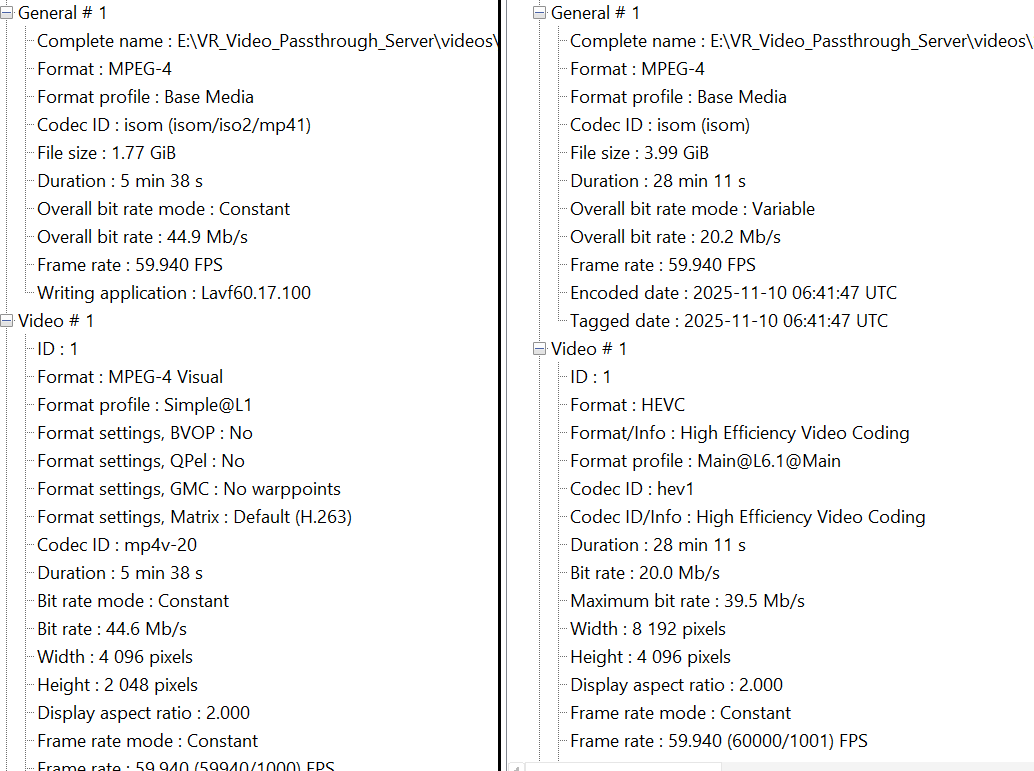
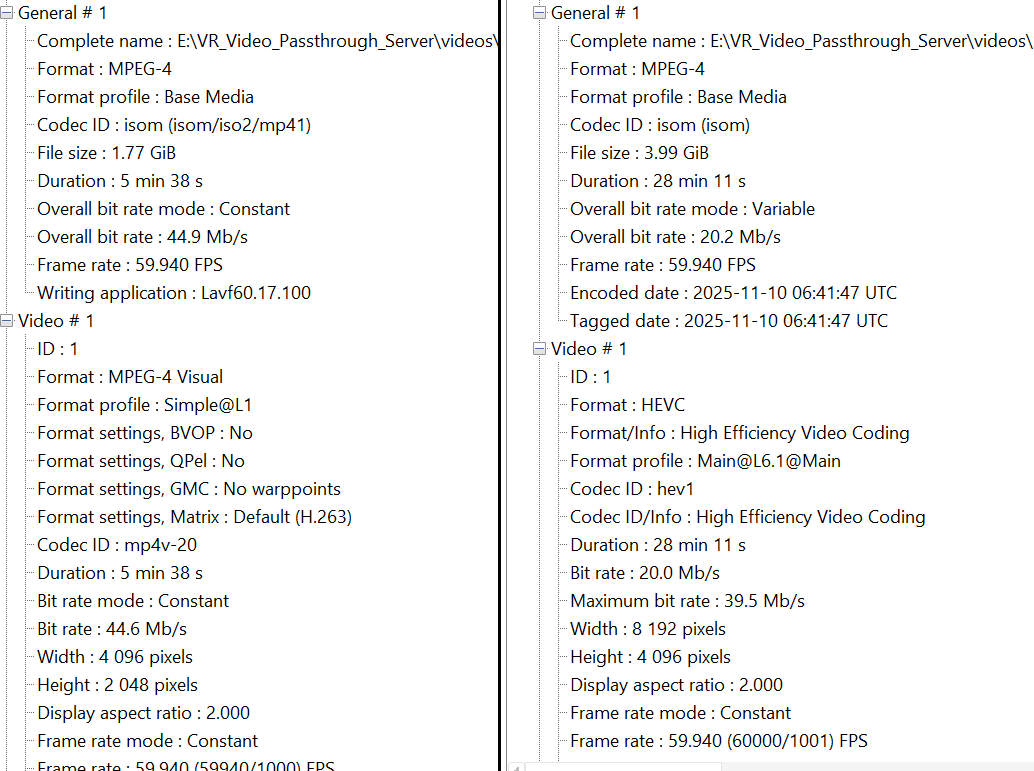
我对比了下右边8k能正常跑离线的视频信息,似乎这个问题是格式问题,左边是无法离线的这个视频的信息,这个视频是之前用软件剪辑过的format那里和8k的hevc不一样,会不会是编码不支持的原因,下面是用您提供的补丁重新跑完的全部错误信息:

[PYI-45324:ERROR] Failed to execute script 'main' due to unhandled exception!
[offline] run: E:\VR_Video_Passthrough_Server\pt_core.exe tool offline_alpha_passthrough E:\VR_Video_Passthrough_Server\videos\1.mp4 --engine rvm --out E:\VR_Video_Passthrough_Server\videos\1_rvm2_S000000_ALL_FISHEYE180_alpha.mp4 --audio copy --model E:\VR_Video_Passthrough_Server\models\rvm_resnet50_fp32.onnx --alpha-stride 1 --input-size 1024 --sbs-batch --bitrate live --preset P7 --cq -1
[offline] env: decoder=simple batch=1 buffer=2 preset=P7 model=
[offline-alpha] decoder=simple batch=1 buffer=2 owned_copy=False
[matting] CuPy 14.0.1 detected, GPU composite enabled.
[matting] options: input_size=1024 square=False split_sbs=True sbs_batch=True alpha_stride=1 alpha_mode=reuse alpha_cutoff=0.0 alpha_hard_edge=False alpha_contrast=1.0
2026-05-17 19:01:02.0277790 [Wnnxruntime:, transformer_memcpy.cc:111 onnxruntime::MemcpyTransformer::ApplyImpl] 1 Memcpy nodes are added to the graph torch-jit-export for CUDAExecutionProvider. It might have negative impact on performance (including unable to run CUDA graph). Set session_options.log_severity_level=1 to see the detail logs before this message.
[matting] model kind=rvm input=src shape=['batch_size', 3, 'height', 'width'] type=tensor(float) batch2=True model_batch2=True rvm_iobinding=True providers=['CUDAExecutionProvider', 'CPUExecutionProvider'] inputs=['src', 'r1i', 'r2i', 'r3i', 'r4i', 'downsample_ratio'] outputs=['fgr', 'pha', 'r1o', 'r2o', 'r3o', 'r4o']
[offline-alpha] src=E:\VR_Video_Passthrough_Server\videos\1.mp4 out=E:\VR_Video_Passthrough_Server\videos\1_rvm2_S000000_ALL_FISHEYE180_alpha.mp4 engine=rvm 4096x2048 source_fps=59.938000 output_fps=59.938000 target=20289 audio=copy bitrate=50000000 maxbitrate=60000000 vbvbufsize=100000000 rc=vbr cq=-1 preset=P7
[offline-alpha] projection=sbs half-equirect 180 -> fisheye sbs radius_scale=1
[offline-alpha] packing=DeoVR-style red-channel alpha blocks scale=0.4 layout=alpha-packer-6block
[offline] mux=.\ffmpeg.EXE -hide_banner -loglevel warning -y -fflags +genpts -f hevc -framerate 59.938000 -i - -map 0:v:0 -c:v copy -an -movflags +faststart -f mp4 E:\VR_Video_Passthrough_Server\videos\1_rvm2_S000000_ALL_FISHEYE180_alpha._video_only.mp4
Traceback (most recent call last):
File "main.py", line 313, in <module>
File "main.py", line 126, in main
File "main.py", line 61, in _run_legacy_tool
File "tools\offline_alpha_passthrough.py", line 1753, in main
File "pipeline\pynv_io.py", line 267, in frame_at
File "yNvVideoCodec\decoders\SimpleDecoder.py", line 86, in __getitem__
_PyNvVideoCodec.PyNvVCExceptionUnsupported: NvDecoder::HandleVideoSequence :
Error code : 801
Error Type : MBCount not supported on this GPU
MBCount : 32768
Max Supported mbcnt : 8192
at G:\build\sw\devrel\PyNvVideoCodec\rel_2_1\src\VideoCodecSDKUtils\helper_classes\NvCodec\NvDecoder\NvDecoder.cpp:275

[PYI-43356:ERROR] Failed to execute script 'main' due to unhandled exception!


761f098e-c64b-4714-97fb-bf3e6a3b1d43.png

216

金钱

67

回帖

56

积分

Lv4 初窥堂奥

积分
56
发表于 2026-5-17 19:21:58 | 显示全部楼层
本帖最后由 5x5x5x4n 于 2026-5-17 19:23 编辑
zelefans 发表于 2026-5-17 18:27
另外,2D视频,技术上现在绿幕模式是透视的,不会强制转VR。实时和离线你都可以试一下。
2D视频暂时没有 ...
可以直接点击下载
跳舞视频1
跳舞视频2

672

金钱

805

回帖

415

积分

Lv6 渐入佳境

积分
415
 楼主| 发表于 2026-5-17 19:50:48 | 显示全部楼层
5x5x5x4n 发表于 2026-5-17 19:11
我对比了下右边8k能正常跑离线的视频信息,似乎这个问题是格式问题,左边是无法离线的这个视频的信息,这 ...

我补丁漏了文件,所以日志没打印出来硬件信息。刚才又更新了一些代码,统一打包为beta1_patch2.7z了,放到同一个目录了。麻烦再试下。其他的我自己看看

216

金钱

67

回帖

56

积分

Lv4 初窥堂奥

积分
56
发表于 2026-5-17 19:56:49 | 显示全部楼层
zelefans 发表于 2026-5-17 17:51
beta版本底下会显示FPS和显存,可以播放时看一下。也可以开启debug,抓一下详细点日志。然后去debug_outpu ...

又测了一遍分别打开4k和8k的vr视频,4xvr还是一帧画面然后就开始转圈不动了,deovr没问题,日志打包给你看看 test.zip (68.44 KB)

216

金钱

67

回帖

56

积分

Lv4 初窥堂奥

积分
56
发表于 2026-5-17 20:01:33 | 显示全部楼层
zelefans 发表于 2026-5-17 19:50
我补丁漏了文件,所以日志没打印出来硬件信息。刚才又更新了一些代码,统一打包为beta1_patch2.7z了,放到 ...

重新下了补丁2又重新跑了一下:
[offline] GPU runtime initialization may take a while on first use. If this is the first offline run after installation or a driver/model update, the window can stay quiet for 1-3 minutes while CUDA/ONNX Runtime caches are built.
[offline] run: E:\VR_Video_Passthrough_Server\pt_core.exe tool offline_alpha_passthrough E:\VR_Video_Passthrough_Server\videos\1.mp4 --engine rvm --out E:\VR_Video_Passthrough_Server\videos\1_rvm2_S000000_ALL_FISHEYE180_alpha.mp4 --audio copy --model E:\VR_Video_Passthrough_Server\models\rvm_resnet50_fp32.onnx --alpha-stride 1 --input-size 1024 --sbs-batch --bitrate live --preset P7 --cq -1
[offline] gpu warmup: state=cache-hit reason=cache_hit eta=1s gpu=NVIDIA GeForce RTX 4070 Laptop GPU cc=8.9 ort=1.25.1
[offline] env: decoder=simple batch=1 buffer=2 preset=P7 model=
[offline-alpha] input codec=mpeg4 profile=Simple Profile pix_fmt=yuv420p bit_depth=8 size=4096x2048
[offline-alpha] cuda gpu_id=0 name=NVIDIA GeForce RTX 4070 Laptop GPU cc=8.9 vram=8.0GB free=6.9GB driver=13020 runtime=12090
[offline-alpha] decoder=simple batch=1 buffer=2 owned_copy=False
[matting] CuPy 14.0.1 detected, GPU composite enabled.
[matting] options: input_size=1024 square=False split_sbs=True sbs_batch=True alpha_stride=1 alpha_mode=reuse alpha_cutoff=0.0 alpha_hard_edge=False alpha_contrast=1.0
2026-05-17 20:00:15.2258264 [Wnnxruntime:, transformer_memcpy.cc:111 onnxruntime::MemcpyTransformer::ApplyImpl] 1 Memcpy nodes are added to the graph torch-jit-export for CUDAExecutionProvider. It might have negative impact on performance (including unable to run CUDA graph). Set session_options.log_severity_level=1 to see the detail logs before this message.
[matting] model kind=rvm input=src shape=['batch_size', 3, 'height', 'width'] type=tensor(float) batch2=True model_batch2=True rvm_iobinding=True providers=['CUDAExecutionProvider', 'CPUExecutionProvider'] inputs=['src', 'r1i', 'r2i', 'r3i', 'r4i', 'downsample_ratio'] outputs=['fgr', 'pha', 'r1o', 'r2o', 'r3o', 'r4o']
[offline-alpha] src=E:\VR_Video_Passthrough_Server\videos\1.mp4 out=E:\VR_Video_Passthrough_Server\videos\1_rvm2_S000000_ALL_FISHEYE180_alpha.mp4 engine=rvm 4096x2048 source_fps=59.938000 output_fps=59.938000 target=20289 audio=copy bitrate=50000000 maxbitrate=60000000 vbvbufsize=100000000 rc=vbr cq=-1 preset=P7
[offline-alpha] projection=sbs half-equirect 180 -> fisheye sbs radius_scale=1
[offline-alpha] packing=DeoVR-style red-channel alpha blocks scale=0.4 layout=alpha-packer-6block
[offline] mux=.\ffmpeg.EXE -hide_banner -loglevel warning -y -fflags +genpts -f hevc -framerate 59.938000 -i - -map 0:v:0 -c:v copy -an -movflags +faststart -f mp4 E:\VR_Video_Passthrough_Server\videos\1_rvm2_S000000_ALL_FISHEYE180_alpha._video_only.mp4
Traceback (most recent call last):
  File "main.py", line 359, in <module>
  File "main.py", line 148, in main
  File "main.py", line 83, in _run_legacy_tool
  File "tools\offline_alpha_passthrough.py", line 1775, in main
  File "pipeline\pynv_io.py", line 292, in frame_at
  File "yNvVideoCodec\decoders\SimpleDecoder.py", line 86, in __getitem__
_PyNvVideoCodec.PyNvVCExceptionUnsupported: NvDecoder::HandleVideoSequence :
Error code : 801
Error Type : MBCount not supported on this GPU
MBCount             : 32768
Max Supported mbcnt : 8192
at G:\build\sw\devrel\PyNvVideoCodec\rel_2_1\src\VideoCodecSDKUtils\helper_classes\NvCodec\NvDecoder\NvDecoder.cpp:275

[PYI-34856:ERROR] Failed to execute script 'main' due to unhandled exception!

672

金钱

805

回帖

415

积分

Lv6 渐入佳境

积分
415
 楼主| 发表于 2026-5-17 20:06:10 | 显示全部楼层
本帖最后由 zelefans 于 2026-5-17 20:08 编辑
5x5x5x4n 发表于 2026-5-17 20:01
重新下了补丁2又重新跑了一下:
[offline] GPU runtime initialization may take a while on first use.  ...

问题找到了,的确是文件编码问题,编码格式太老,不支持PyNv,我离线模式会回退到ffmpeg处理,速度会慢。 正在改代码,很快放出下一版PATCH针对这个问题。 在线模式再看。

有没有测试视频啊……太老的格式找不到……

216

金钱

67

回帖

56

积分

Lv4 初窥堂奥

积分
56
发表于 2026-5-17 20:24:11 | 显示全部楼层
zelefans 发表于 2026-5-17 20:06
问题找到了,的确是文件编码问题,编码格式太老,不支持PyNv,我离线模式会回退到ffmpeg处理,速度会慢。  ...

如果是编码太老问题倒是不大,我觉得没必要在老东西上面浪费精力,大不了重新转换一下,倒是优先解决一下4xvr卡住无法播放的问题比较有实际意义啊

672

金钱

805

回帖

415

积分

Lv6 渐入佳境

积分
415
 楼主| 发表于 2026-5-17 20:47:27 | 显示全部楼层
本帖最后由 zelefans 于 2026-5-17 21:05 编辑
5x5x5x4n 发表于 2026-5-17 20:24
如果是编码太老问题倒是不大,我觉得没必要在老东西上面浪费精力,大不了重新转换一下,倒是优先解决一下 ...

我更新了beta1_patch3.7z,你可以试下,应该可以解码你那个问题视频了。可以反馈一下日志,可以看到每一步慢多少。
patch4在做,针对你的4xvr,可以等等

672

金钱

805

回帖

415

积分

Lv6 渐入佳境

积分
415
 楼主| 发表于 2026-5-17 21:13:31 | 显示全部楼层
5x5x5x4n 发表于 2026-5-17 20:24
如果是编码太老问题倒是不大,我觉得没必要在老东西上面浪费精力,大不了重新转换一下,倒是优先解决一下 ...

识别到的应该是4XVR的播放器类型:AVProMobileVideo/14.3.2572 (Linux;Android 10) ExoPlayerLib/1.4.1
看到 4XVR 会主动短周期断开并重连,同一段里多次出现 finally begin,例如 10 秒、6 秒、8 秒、44 秒后重连。

可以下载安装beta1_patch4.7z了,策略会走另一条播放策略。

但很奇怪我Quest3上识别不是这个UA头。你是什么设备

216

金钱

67

回帖

56

积分

Lv4 初窥堂奥

积分
56
发表于 2026-5-17 21:24:41 | 显示全部楼层
zelefans 发表于 2026-5-17 20:47
我更新了beta1_patch3.7z,你可以试下,应该可以解码你那个问题视频了。可以反馈一下日志,可以看到每一步 ...

刚测试了,已经完美解决可以转换了,下一步如果可以降低显存占用提速就好了,16g显卡并不普及,是否可以参考facefusion那类使用tensorrt加速还有使用半精度模型这类手段让8G以下的用上MatAnyone2大模型?
您需要登录后才可以回帖 登录 | 立即注册

本版积分规则

Copyright © 2026 4ktwo.com All Rights Reserved.
关灯 快速发帖返回顶部
快速回复 返回顶部 返回列表